You finally received a tracking number from the store, pasted it into a tracking form and got nothing: "not found", "invalid tracking number", "no information available" or just an empty page. It is easy to assume the worst – that the parcel is lost or the seller is cheating. In practice, this message almost never means that something has happened to your package. In most cases the number is simply too new, it was copied with a small mistake, or it is being checked in the wrong place.
Below are the ten most common reasons why a tracking number does not work, how to recognise each of them and what to do. At the end you will find a short checklist, a ready-to-send message for the seller and answers to frequent questions.
To understand why a number can be "not found", it helps to know where tracking information comes from. A tracking number is not a GPS beacon. It is a barcode on the shipping label. Every time an employee or a sorting machine scans that barcode, the carrier's system records an event: where the parcel was, when, and what happened to it. The tracking page simply shows the list of these scans.
This means two important things. First, a number can exist long before the parcel is scanned for the first time – the seller can print a label today and hand the parcel to the courier only in three days. Second, between two scans the system knows nothing. If there are no scans, there is nothing to show.
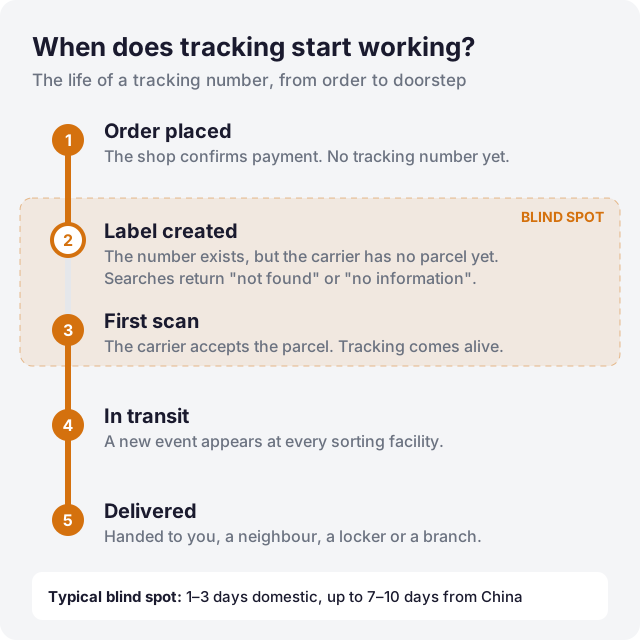
This is the reason in the vast majority of cases. When a seller creates a shipping label, the number is generated immediately and is often sent to you automatically. But the carrier learns about the parcel only after the first scan at a branch, a pickup point or a sorting center. Until then, the carrier's database either has no record or shows only "label created" or "shipment information received".
For domestic shipments, the first scan usually appears within 1–3 days. For orders from online marketplaces in China, it can take 7–10 days: the parcel first goes to a consolidation warehouse, then to an export hub, and only there it gets scanned into the international network. What to do: wait. Check again in 24–48 hours. Do not panic during the first few days.
Tracking numbers are long and consist of similar-looking characters. The most common mistakes are the letter O instead of the digit 0, the letter I or l instead of 1, a missing last digit, or an extra space at the beginning or end. When copying from an email or a messenger, an invisible formatting character can also get stuck to the number.
What to do: retype the number manually instead of copying it, and compare it with the original character by character. International postal numbers have a fixed length of 13 characters – two letters, nine digits and two letters, for example RB123456789CN. If your number is 12 or 14 characters long, something is missing or extra.
Every carrier only knows its own numbers. A Nova Poshta number will never be found on the Ukrposhta website, and a UPS number will not be found on the USPS website. Many people try the carrier they expect rather than the one that actually ships the parcel.
Formats can give a hint: Nova Poshta numbers are usually 14 digits and start with 20 or 59, Ukrposhta domestic numbers usually consist of 13 digits, UPS numbers start with 1Z, Cainiao logistics numbers often start with LP. What to do: use a tracker that detects the carrier automatically. On our site, you can simply paste the number into the search field at the top of the page – the system will recognise the format and check the right carrier.
Online stores show many different numbers: order ID, invoice number, payment ID, internal package number. Only one of them is a tracking number issued by a carrier. A store order number will not be found by any carrier, because it exists only inside the store.
What to do: look for a field labelled "tracking number", "shipment number" or "waybill" in the order details. If the store shows only one long number and calls it "order", ask the seller for the actual tracking number and the name of the carrier.
International parcels often travel with several companies. A typical example: a parcel from China starts its journey with a Chinese logistics company, then crosses the border with an international operator and finally gets delivered by a local postal service or courier. At the handover point, the parcel sometimes receives a new tracking number, and the old one stops updating or even disappears from the local carrier's system.
What to do: look at the last events of the original number – there is often a mention like "handed over to the last-mile carrier" with a new number. Our tracker detects such linked numbers automatically when the carrier provides them. You can also ask the seller whether a "last-mile" number has been issued.
The cheapest shipping options are sometimes tracked only partially – for example, only until the parcel leaves the origin country. After that, the destination postal service does not receive the data, and the number stops updating or cannot be found locally. For international postal items, the first letter of the number gives a hint: numbers starting with R, L, C or E are usually tracked from end to end, while numbers starting with U often have only limited tracking.
What to do: check the shipping method in the order. If it is a "standard", "economy" or "untracked" option, the absence of data in your country may be normal. The parcel can still arrive – it just will not report its journey.
Carriers do not store tracking data forever. Depending on the company, history is available for several months, sometimes less. If you are checking an old number – for example, to confirm a delivery from last year – the system may answer that the number does not exist.
What to do: for old shipments, ask the carrier's customer service directly. They can often find archived records that are no longer shown on the website.
Carrier systems are not perfect. During peak seasons such as November sales and the weeks before Christmas, data transfer between systems can be delayed by many hours. Websites can be temporarily unavailable, show errors or block automated requests from tracking services.
What to do: try again later. If one source does not answer, another one may. A tracking service that checks several sources helps here – if the main carrier website is unavailable, the data may still be available elsewhere.
Sometimes a seller creates a label, then changes the carrier, the size of the parcel or the shipping method and creates a new one. The first number then remains "registered" but never gets a single scan. You have the old number, while the parcel travels with the new one.
What to do: if a number has shown only "label created" for more than a week, ask the seller to confirm that this is the final tracking number and that the parcel has actually been handed over.
Unfortunately, this also happens. Dishonest sellers sometimes provide a random number, a number of a completely different parcel, or a number that shows delivery to another city or country. The goal is to make the order look "shipped" and to run out the clock on the buyer protection period.
Warning signs: the destination in the tracking is not your city, the parcel was "delivered" long before it could have arrived, or the weight and route do not match your order. What to do: contact the seller immediately and, if they cannot give a valid number, open a dispute on the marketplace before the protection period ends.
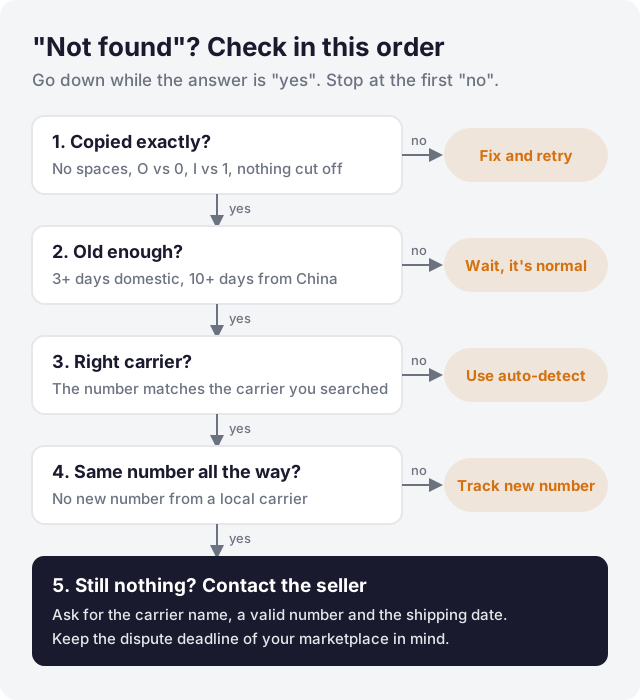
If you do not want to read all ten reasons every time, use this short sequence. It covers almost every case in the order of probability.
A short, specific message gets a faster answer than an emotional one. You can use this template:
Hello! My order No. [order number] has the tracking number [tracking number], but it has not been found in the carrier's system for [number] days. Please confirm the name of the carrier, check that the tracking number is correct and tell me the date when the parcel was handed over for shipping. If a new number was issued, please send it to me. Thank you!
Save the seller's answer. If you have to open a dispute later, this correspondence will help you.
In most cases the problem resolves itself within a few days. But you should act if:
In these situations, open a dispute or a claim with the platform where you bought the item. Most marketplaces show a protection countdown on the order page – make sure you do not miss it. After the deadline, getting your money back becomes much harder.
Usually from a few hours to 3 days for domestic parcels. For international orders from marketplaces, the first meaningful event can take up to 7–10 days to appear.
Almost never. It means that the carrier has not scanned the parcel yet or that the number is being checked in the wrong place. A lost parcel usually has a history that suddenly stops – not an empty one.
No. Carriers search only by their own tracking numbers. Ask the store for the tracking number and the carrier's name.
Different sites receive data from different sources and at different times. Some show the parcel only after it reaches their system. A tracker with automatic carrier detection checks the right source for you.
Paste your tracking number into the search field at the top of this page. We will identify the carrier automatically, check more than 30 delivery services – including Nova Poshta, Ukrposhta, Meest, DHL, UPS, Cainiao and others – and show the full history of your parcel. If the parcel gets a new number from another carrier along the way, we will try to find it too.
If the parcel is moving but the updates have suddenly stopped, read our guide Package Stuck in Transit: How Long Is Normal and When to Worry. And if you are not sure what a particular status means, see Tracking Statuses Explained.
 Track my package